Free tool
Make a full-size, printable nail template for a round or square string art frame: every nail position on the frame line, every nail numbered outside the frame. The default numbering matches StringPhoto designs, so your winding plan and your nails line up.
To see the template at its real size on screen, hold a bank card (85.6 x 54 mm, 3.37 x 2.13 in) against the box below and move the slider until the box matches the card exactly. This only changes the on-screen view; the PDF is always full size.
The PDF is one page with the whole template. Print it at 100%: "Fit to page" or "Shrink oversized pages" make it smaller and the nails land in the wrong places. Measure the 10 cm bar on the template with a ruler before you hammer a single nail.
The easiest way to print a large PDF at full size over several pages is with the free Adobe Acrobat Reader: get Adobe Reader (check whether you want the "optional offers" before installing).
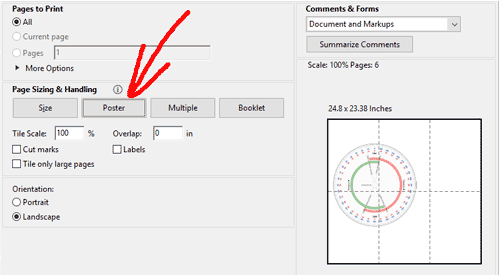
Very large templates: make the template at a smaller scale and scale it back up with Tile Scale when you print. For example, choose Scale 20% above and enter 500% in Tile Scale (20% x 500% = full size). The PDF says which Tile Scale to use.
Send the PDF to a copy or print shop for large-format ("plan" or "engineering") printing on a single sheet, and ask for "100%, actual size, no scaling". The page-size box above shows which paper sizes are big enough. Check the 10 cm bar before you leave the shop.
| Size | mm | inches |
|---|---|---|
| Letter | 215.9 x 279.4 | 8.5 x 11 |
| A4 | 210 x 297 | 8.27 x 11.7 |
| Tabloid | 279.4 x 431.8 | 11 x 17 |
| A3 | 297 x 420 | 11.7 x 16.5 |
| A2 | 420 x 594 | 16.5 x 23.4 |
| Arch C | 457.2 x 609.6 | 18 x 24 |
| A1 | 594 x 841 | 23.4 x 33.1 |
| Arch D | 609.6 x 914.4 | 24 x 36 |
| A0 | 841 x 1189 | 33.1 x 46.8 |
| Arch E | 914.4 x 1219.2 | 36 x 48 |
Bought a StringPhoto digital download? Your downloads include a "Nail template" PDF for your design, numbered to match your winding plan.
Studio
Choose this first so we can set up the right frame. Every design uses 3,500 thread connections (5,000 for group photos with 2 or more people).
Frame size
Kits and finished pieces are round.
Frame shape
Match the nail count and size of the frame you'll wind on. More nails give finer detail. Building your own frame? Make a free full-size nail template.
Have a saved project?